


Subtitles for vertical drama that read fast and stay in sync with quick cuts
A subtitle generator built for vertical drama: character and duration limits per line, the safe position on a 9:16 screen, and a translation pipeline for cross-market distribution.
Most viewers in a vertical feed begin watching with the sound off. They turn it on only after deciding the episode is worth their attention, and that decision is made within seconds.
That means subtitles carry the entire dialogue during the part of the episode that matters most. An episode whose captions arrive late or read poorly loses viewers not because the story is weak but because the story does not arrive.
This page covers the limits that keep captions readable, where they belong on a vertical screen, how to translate them for multiple markets, and the breaking mistakes that quietly cost you viewers.
The key points on this page
- Practical limits per subtitle block: two lines, around 42 characters per line, on screen 1-6 seconds.
- The safe position on a 9:16 screen so captions are not covered by the app.
- A translation pipeline from audio through to burned-in captions for cross-market release.
- Why subtitles decide retention for viewers watching without sound.
- The line-breaking mistakes that make subtitles hard to read.
Subtitles are part of the image
Most viewers in a vertical feed start with the sound off, turning it on only after deciding the episode deserves attention. That decision lands in the first seconds.
So captions carry the whole dialogue during the part of the episode that decides everything else. An episode whose captions arrive late or read poorly loses viewers not because the story is weak but because the story does not reach them.
The practical consequence is that captions should be designed alongside the image rather than added after it. Face placement, eye lines, and empty space in the frame should already account for where the captions will sit.
Practical limits for one subtitle block
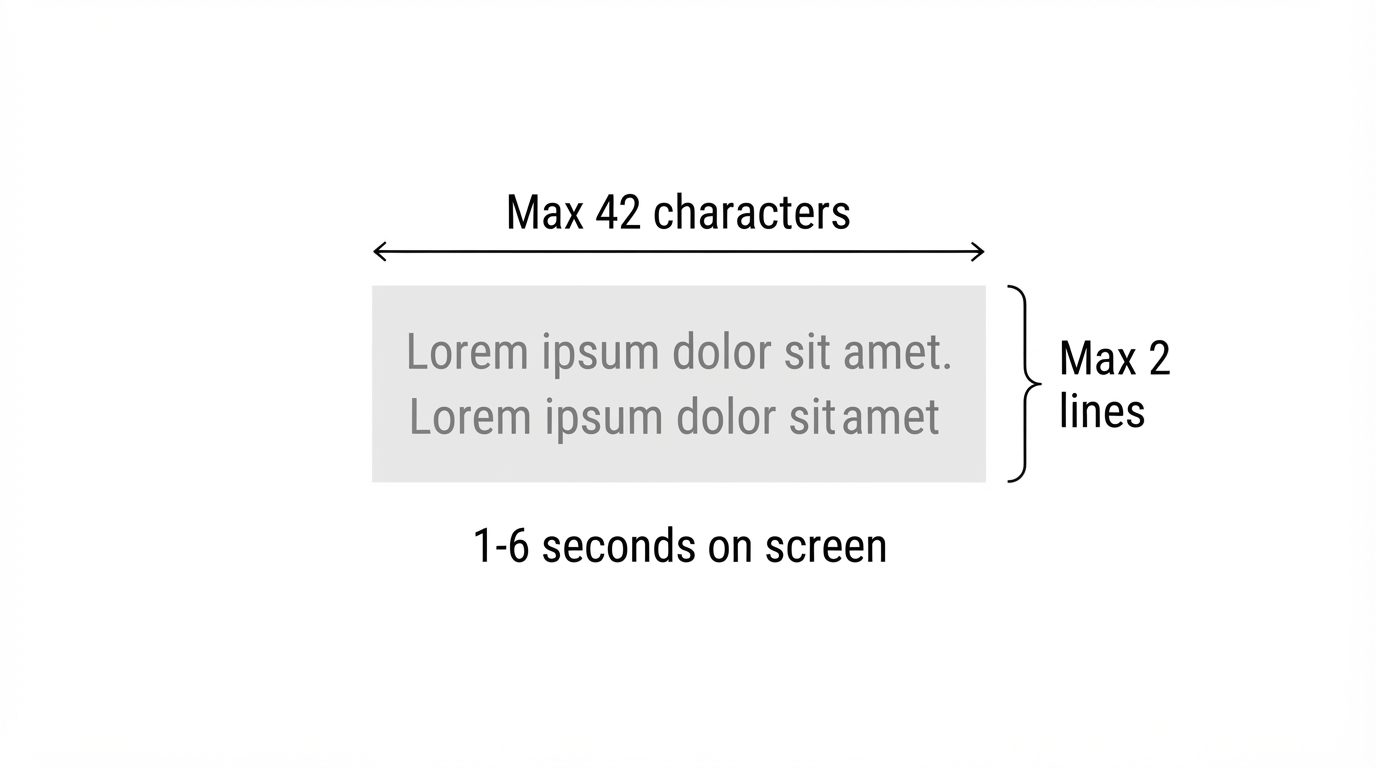
Three numbers cover almost every case: a maximum of two lines, around 42 characters per line, and between one and six seconds on screen.
Two lines is the limit that can be taken in at a glance. Three forces the eye downward, and on a phone that movement is enough to miss what is happening in the image.
Forty-two characters per line is a compromise between word count and a font size that stays comfortable on a phone. If your line exceeds it, split in the script rather than at the caption stage, because a good split usually changes the word choice.
On screen for under a second is barely readable; over six seconds and the caption feels detached from the image. For rapid dialogue, splitting into two short blocks beats holding one long one.
Safe position on a 9:16 screen
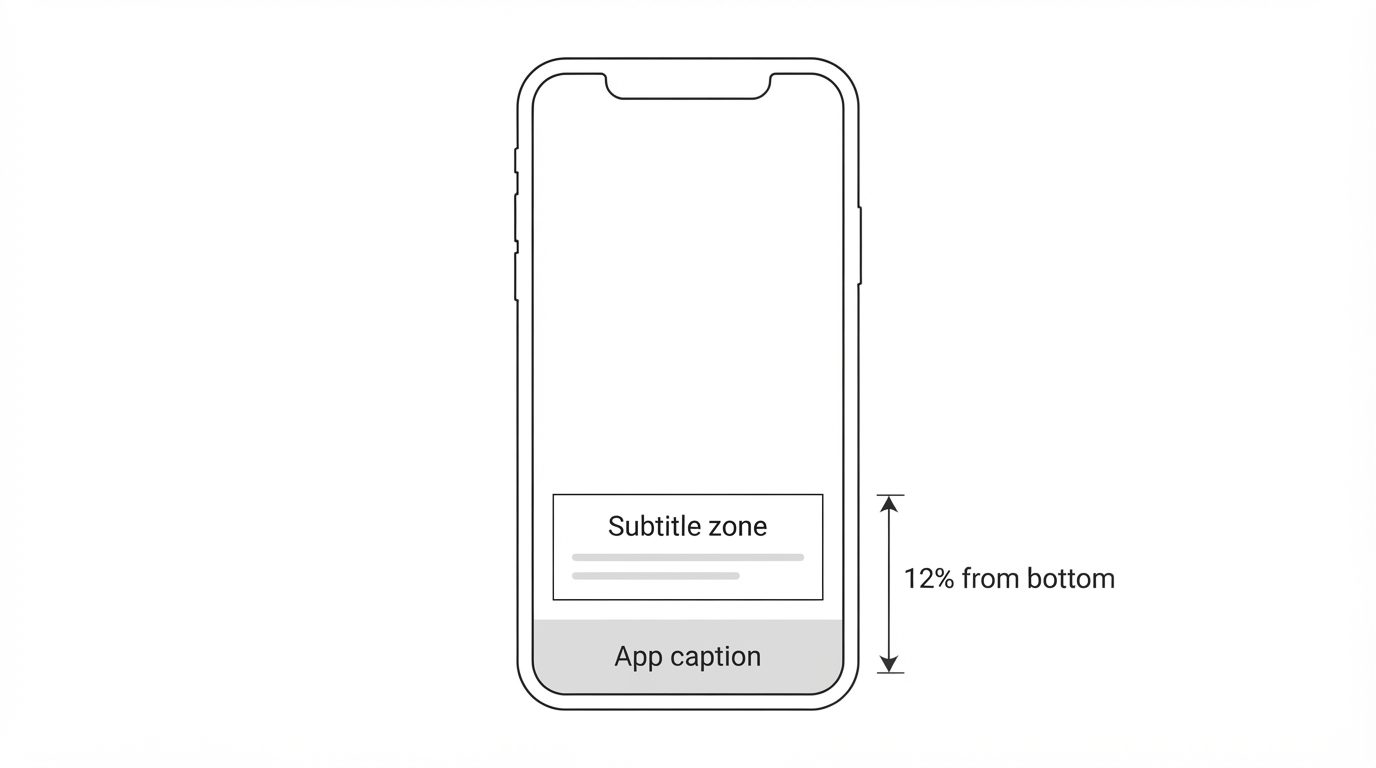
The bottom of a vertical screen is already used by the app for the caption, account name, and audio credit. Subtitles placed too low get covered, and what gets covered is usually the final line carrying the important part of the sentence.
A safe position for most platforms sits around twelve per cent from the bottom edge. That is high enough to clear the app caption and still low enough not to obscure a character's face.
Avoid centring subtitles on screen except for deliberate emphasis. Centre captions cover the part of the frame most often carrying expression, and expression is the main reason viewers stay.
Check the final result on an actual phone rather than a large monitor. Font sizes that look generous on a desktop frequently turn out to be too small on the device viewers really use.
A translation pipeline for cross-market release
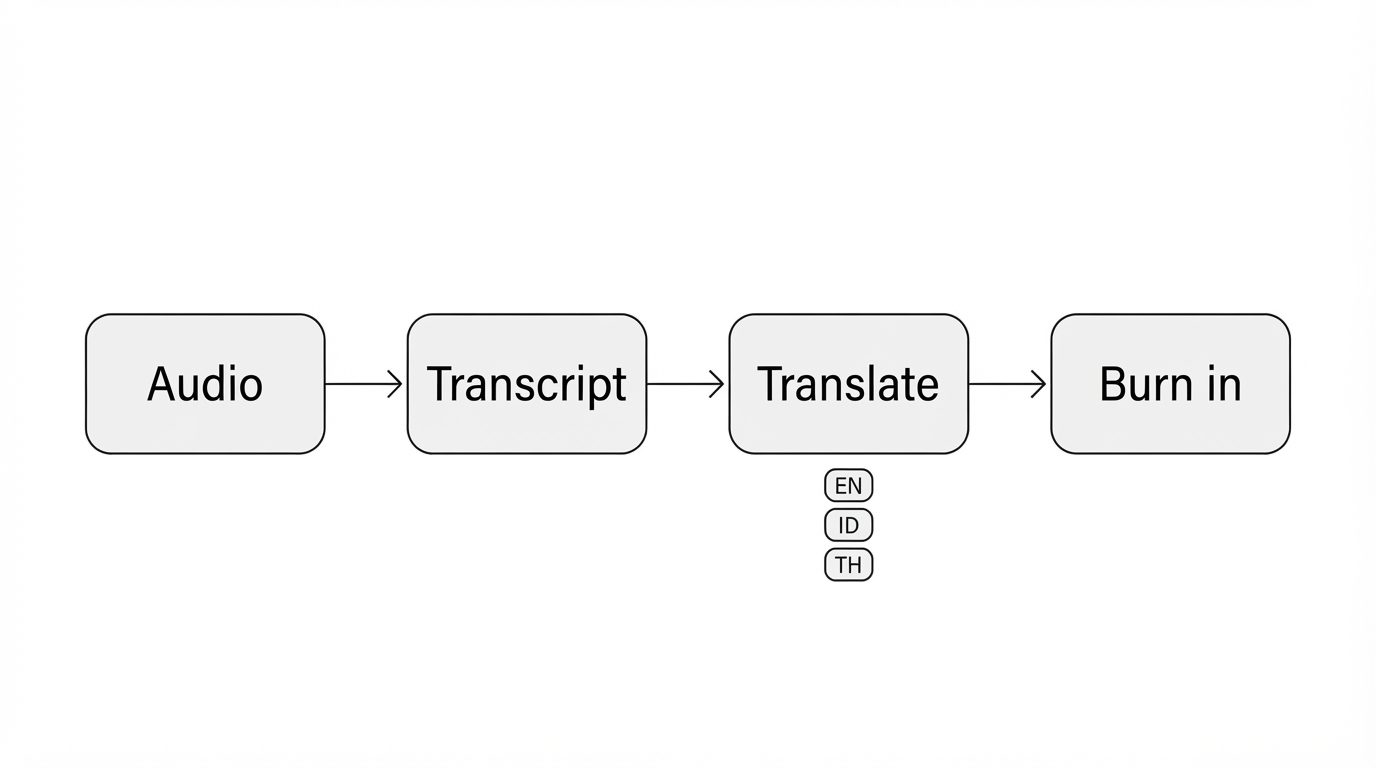
For Southeast Asian distribution, one title often needs to run in several languages. The pipeline goes audio, transcript, translation, then captions burned into the image.
Translating from the transcript is far more accurate than translating from already split captions, because line breaks in one language almost never suit another. Translate whole sentences, then re-split per language.
Sentence length changes between languages, sometimes considerably. Plan for a block that fits two lines in one language to need three in another, and adjust the split rather than the font size.
For distribution to third-party platforms, burned-in captions are safer than separate files, because not every platform renders caption files the same way.
Breaking mistakes that make subtitles hard to read
Breaking mid-phrase. Separating an adjective from its noun forces the reader to hold meaning until the next line. Break at natural phrase boundaries even when the two lines end up uneven.
Showing a caption before the line is spoken. A caption that precedes the audio leaks the dialogue and kills the surprise, particularly on lines meant to land hard.
Holding a caption past a cut. When the scene changes, a leftover caption makes viewers attribute the line to the new scene.
Transcribing dialogue exactly, filler words included. Good captions trim filler as long as the meaning is unchanged, because eyes read more slowly than ears hear.
How to use this theme in production
Finish the dialogue first
Building captions before the dialogue is final almost always means doing it twice.
Split long lines in the script
Any line exceeding two caption lines is split while writing, not while timing.
Apply the two-line and 42-character limits
On screen between one and six seconds per block.
Place captions in the safe zone
Around twelve per cent from the bottom, above the app caption.
Align captions to the cuts
Never ahead of the audio, never held past a scene change.
Check on a real phone
Sizes that look fine on a monitor are often too small on the actual device.
Frequently asked questions
Why do subtitles matter so much for short drama?
Most viewers in a vertical feed start watching with the sound off and turn it on only after deciding the episode deserves attention. Captions carry the entire dialogue during exactly the part that decides everything else.
What is the maximum length for one subtitle line?
Around 42 characters, with a maximum of two lines per block. Three lines force the eye downward, and on a phone that movement is enough to miss what is happening in the image.
How long should one subtitle block stay on screen?
Between one and six seconds. Under a second is barely readable; over six seconds the caption feels detached from the image. For rapid dialogue, split into two short blocks.
Where is the safe position for subtitles on 9:16 video?
Around twelve per cent from the bottom edge. Lower risks being covered by the app caption and account name; centred covers the expression that keeps viewers watching.
How should subtitle lines be broken?
At natural phrase boundaries, even when the two lines end up uneven. Separating an adjective from its noun forces the reader to hold meaning until the next line arrives.
Do subtitles have to match the dialogue exactly?
No. Good captions trim filler words when the meaning is unchanged, because eyes read more slowly than ears hear. What must not change is the content and tone of the line.
Why must subtitles never appear before the audio?
Because it leaks the dialogue. On a line meant to land hard, a caption arriving first removes the whole effect. Sync the start of the block with the start of the spoken line.
How do you make multi-language subtitles for one title?
Translate from the full transcript rather than from already split captions, then re-split per language. Line breaks that work in one language almost never work in another.
Sentence length changes after translation, what should be adjusted?
Adjust the split, not the font size. Shrinking the type to fit makes captions hard to read on a phone, whereas splitting into two blocks costs nothing in legibility.
Are burned-in subtitles better than separate files?
For distribution to third-party platforms, burned-in is safer because not every platform renders caption files the same way. Separate files remain useful for archiving and re-translation.
When in the production workflow should subtitles be made?
After the dialogue is final. Building captions before the dialogue is locked almost always means doing the work twice, because changing one word can change the whole block split.
How do you make sure subtitles read on every device?
Check the final result on an actual phone, not only on a monitor. Font sizes that look generous on a large screen frequently turn out too small on the device viewers really use.


Page summary
This section answers the most common questions so you can understand the page context faster before moving to the next creative step.